

~*~ software engineer ~*~





|

SIDE PROJECTS
|
 Things I build for fun

 Graphverb Graphverb | |
Spectral-aware reverb processing in C++ with JUCE
The process begins with spectral analysis using an STFT, followed by constructing a spectral graph where each bin is a node, and clustering it via a k-means variant. Each cluster is processed through an energy-scaled reverb, and the weighted wet signals are mixed with the dry signal for output. [C++] [JUCE] [STFT] [k-means] [Audio plugin] |
| PDrum | |
Physical drum simulation in C++ with JUCE
The simulation is based on the wave equation and uses a finite difference method to solve it in real time. It is designed to be efficient and accurate, allowing for real-time interaction with the drumhead and resonator. [C++] [JUCE] [Wave equation] [Finite differences] [Physical modelling] |
| dibiff | |
Directed audio graphs in C++
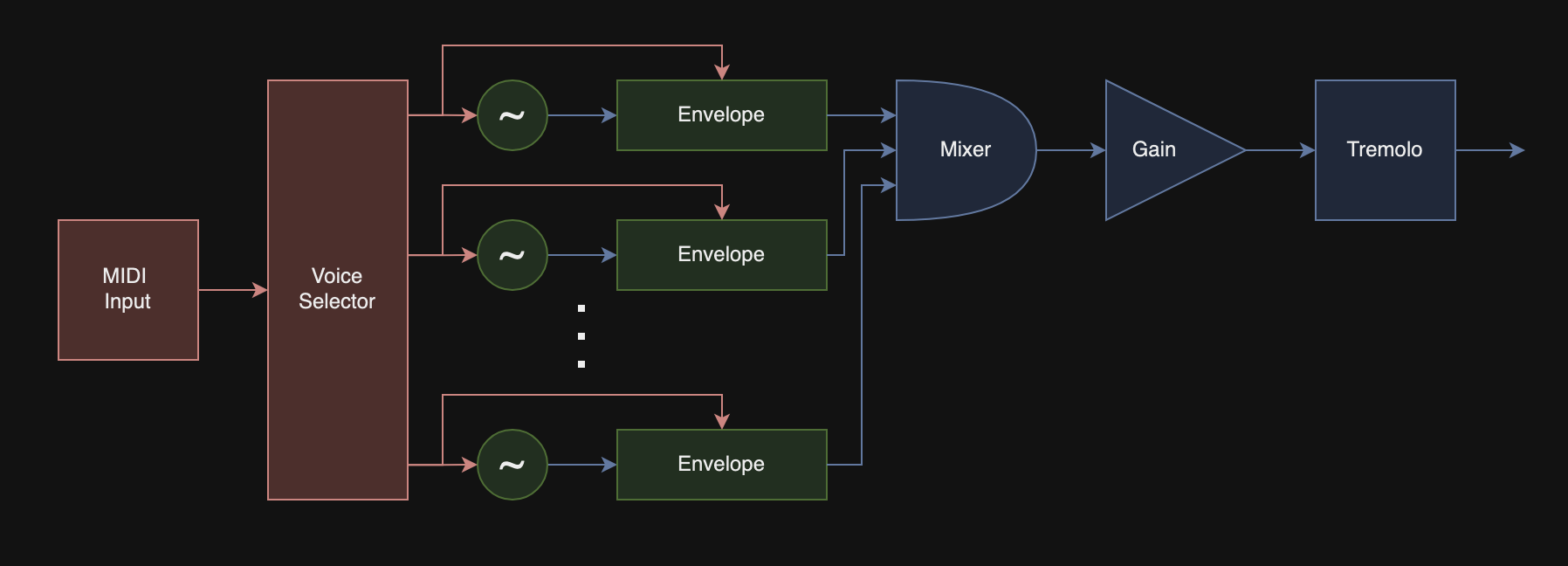
Precision and timing were carefully monitored and managed to ensure low latency and high throughput for easy integration into any environment. CMake is used for build configuration, and the Eigen library is used for vector math and Single-Instruction-Multiple-Data (SIMD) operations. There is already support for a range of audio-processing blocks, such that simple synthesizers can be constructed and played in real time via a MIDI controller:
[C++17] [CMake] [Eigen] [SIMD] [MIDI] [Multithreading] |
| FLAP |
Flexible Layout Audio Playground: a GUI for dibiff Flexible Layout Audio Playground is a GUI companion in C++17 for This tool allows the user to design an audio graph of interconnected audio objects, each operating on a block of sampled audio, in a drag-and-drop environment. [C++17] [OpenGL] [GLFW] [ImGui] [CMake] |
| OpenGL Renderer | |
Model renderer using OpenGL and GLFW in C++ Features
The renderer uses OpenGL version 3.3, which is very widely supported. GLAD is used to handle the locating of driver-specific functions, enabling interoperability between different systems. GLFW provides easy functionality for creating an OpenGL instance, handling user input, and displaying the buffer to a window. The engine handles the inputs from the keyboard and mouse, and therefore also handles the control of the camera. The camera and inputs are passed to the scene, which is rendered every frame. The scene contains a mixture of objects, models, and lights. In addition, there are various shaders attached to the scene that are used for different rendering conditions, like the generation of shadows. There are four types of shaders used in the main rendering loop:
To generate both directional and point shadows, a shadow map is used: the scene is rendered from the point of view of the light source, and only the depth buffer is kept. This allows each fragment to determine whether or not it is blocked from the light source. For directional light sources, an orthographic projection matrix is used to render the depth buffer of a scene. For point sources, a cube map is used instead. Model loading is performed with Assimp, which allows for the importing of models in a multitude of formats. [C++] [OpenGL 3.3] [GLAD] [GLFW] [Assimp] [Shadow mapping] |
| WebGL Renderer | |
Brownian motion rendered live in your browser The animation on the left is rendered in-browser directly using WebGL, which can utilize your GPU for better performance. Brownian motion is an estimation of the random motion of particles that are suspended in a medium like a liquid or gas. The noise map is generated by a fragment shader that generates fractal patterns using a fractal Brownian motion algorithm. [WebGL] [GLSL] [Fragment shaders] [fBm] |




© 2026 Alex Parisi · Built by hand, hosted on GitHub Pages.
GitHub | LinkedIn | Email